

Guide
Foundry’s tools are on the Helix MCP, at https://mcp.helix-db.com/mcp. Connect your
agent to it, sign in once, and the agent works in Foundry as you: it reads your
ontologies, their versions, loads and graph, asks them questions, and makes the changes
you ask for, most after a confirmation. It can’t add a connector’s credentials, delete
connections, ontologies or documents, or change billing; those stay on the website.
Connect your agent
The MCP signs you in with OAuth in your browser, with the account you use for Foundry.- Claude Code
- Codex
- Other clients
/mcp in Claude Code and sign in.
To add only the setup skill:
Set up a workspace with your agent
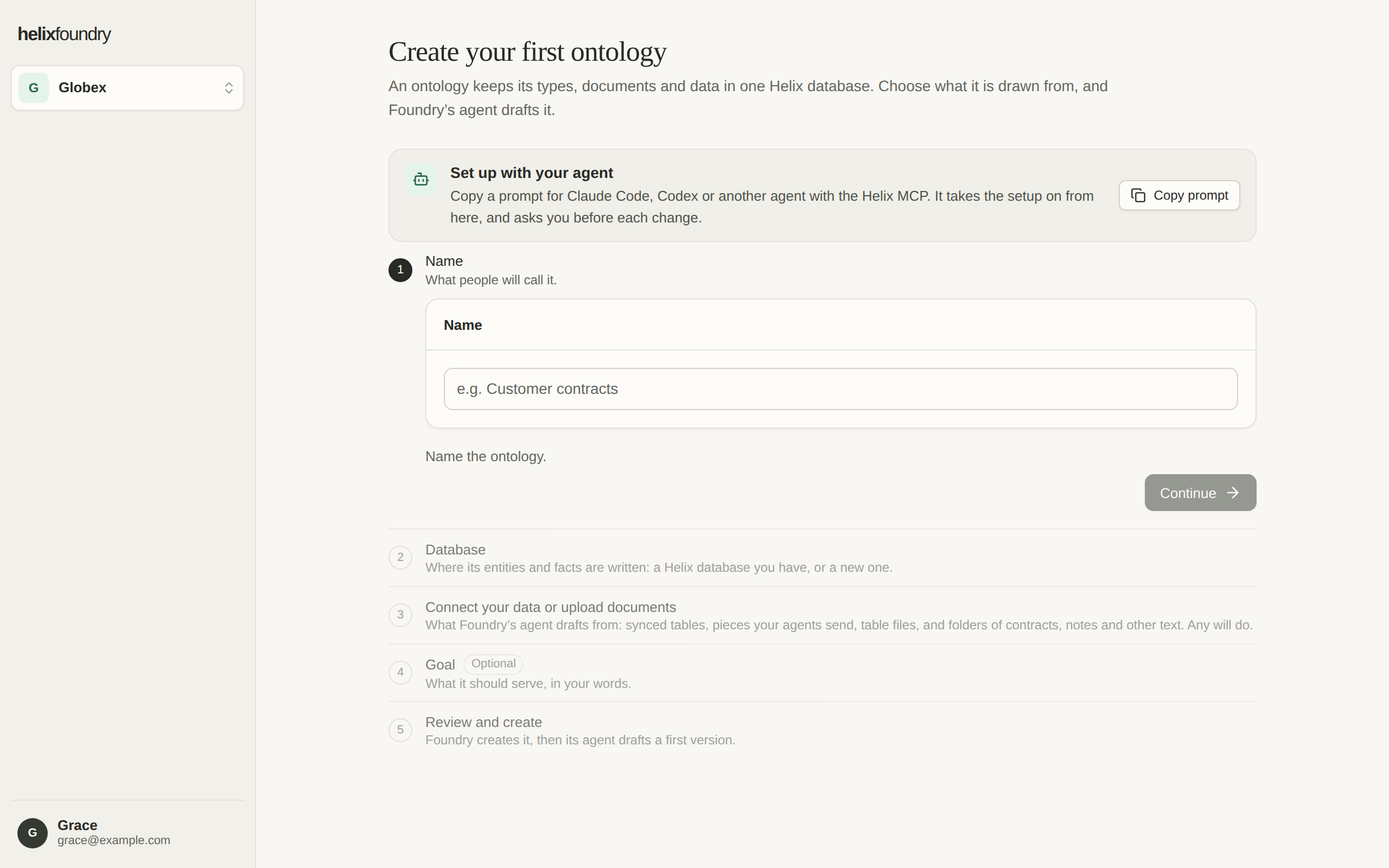
On a new workspace’s Get started page, under Or start with your own, Set up with your agent is chosen first: Copy prompt copies a prompt for Claude Code, Codex or another agent with the Helix MCP. Set up with your agent on an unfinished ontology’s overview does the same from where that ontology stands. With no workspace or account yet, tell your agentsetup https://foundry.new, as the
quickstart shows.
The prompt says how to connect the MCP, where setup stands and the steps left, and has
the agent follow the helix-foundry-onboarding skill if it has it. The agent asks you
before each change it makes.
What your agent can read
Reading a load, through the graph or through questions, needs Query read on the
database’s Helix project, as on the website.
Ask questions
helix_foundry_ask asks an ontology’s load a question in
plain language, as Founder does, and waits up to 25 seconds for the answer. A
longer question carries on: the agent follows it with helix_foundry_get_question, which
waits up to 25 seconds each call, and stops it with helix_foundry_cancel_question. helix_foundry_list_questions lists the ontology’s
questions. Questions asked through the MCP count against the same hourly limit and
monthly budget as those Founder asks.
In a client that draws MCP Apps, the answer shows as a card with its charts and tables,
and a link to the question in Foundry. Other clients get the answer as text.
Changes, with a confirmation
Every change takes two calls.helix_foundry_prepare_operation checks the change and
returns a confirmation for it: one-time, valid for five minutes, and bound to that
operation, its target and its exact payload. helix_foundry_execute_operation uses the
confirmation and makes the change once. Agents with Helix’s skills show you what they
are about to do and ask before they execute it.
A change is refused for the same reasons as on the website: your role, the database’s
project rights, a sync or generation already running, the
workspace’s hourly generations, or the month’s
spending caps. Making a version current is refused if someone moved the current
version since the agent read it.
Use cases
A use case is an agent’s task over one ontology, such as answering support tickets. Each run records the agent’s request, every read, question, send and upload it makes for it, and its answer, so you can see what the ontology gave the agent. Runs show on the ontology’s Usage page with an assessment of how much the ontology helped, which uses AI models and counts toward the month’s Run assessments cap.Workflows
A workflow runs steps for you on a trigger, as the person who made it. Your agent reads them withhelix_foundry_list_workflows, helix_foundry_get_workflow,
helix_foundry_list_workflow_runs and helix_foundry_get_workflow_run. It can create,
update, pause, resume, run or delete one through the prepare and execute calls
(create_workflow, update_workflow, pause_workflow, resume_workflow,
run_workflow, delete_workflow). Any member can do this for their own workflows, except members limited to
source grants, and owners and admins can also
pause or delete anyone’s. A
workflow the agent creates, or whose steps it changes, runs only after its owner
approves it in Foundry.
Connectors stay on the website
An agent never handles a connector’s credentials. When you ask it to connect a source,helix_foundry_connect gives it a link to open in your browser. For GitHub and Linear
you sign in at the provider, and the agent follows the sign-in with
helix_foundry_get_sign_in. For other kinds the link opens Foundry’s Add data form
for that kind, in your workspace, such as
https://foundry.helix-db.com/data?add=stripe&workspace=<id>, where you enter the
credentials. The same tool signs a connection in again when it needs it.
API sources hold no credentials, so an agent can create one,
send it pieces with helix_foundry_send_pieces, and read them back with
helix_foundry_recall, which makes a source the agent’s
memory.
Service credentials
For an agent that runs without a person, such as in CI, use a Helix service credential (hlxs_…) as the MCP’s
bearer token instead of signing in: --header "Authorization: Bearer hlxs_…" for Claude
Code, or bearer_token_env_var in Codex’s MCP config. Keep it in a secret store, never
in a prompt or a repository.
A service credential reaches only the ontologies whose database is in a project it is
granted, or that its sources cover, and only an ontology a person has set up.
To limit an agent to some of your data, make its key in Foundry under Settings →
Access → Agents and give it sources, rather than granting it a project.
It can’t list or sync connections, generate drafts, create ontologies or API sources,
or settle reviews: those need a person.
An API source’s send token (
hx_ev_…) works as a
bearer token too, and sees only helix_foundry_send_pieces, for its own source.
Report a problem
helix_feedback sends Helix a bug, a missing capability or a confusing result, one
call per problem, without your data. Helix’s skills have agents use it when something
goes wrong. Each caller can send 20 an hour, of up to 4,096 bytes each.
Next steps
API sources
Send your app’s or agent’s data to Foundry.
Agent memory
Have your agent remember in an API source and recall it later.
Ask questions
How questions are answered, and their limits.
Workflows
Run steps on a schedule or when something happens, as you.